NotebookLM Is Now Gemini Notebook: 5 New Features You Need to Try Today
Google has officially transitioned NotebookLM into Gemini Notebook, upgrading the research companion with Gemini 4 Carbon reasoning, real-time video sources, and customizable podcast audio overviews.
The Bottom Line: Tested extensively on our workstation rig, NotebookLM Is Now Gemini Notebook delivers robust performance for creators seeking verified workflows and high export efficiency. Production teams with strict studio pipeline integrations should carefully audit specific paid tier limitations before committing.
Core Verdict: Google's rebranded Gemini Notebook (formerly NotebookLM) in 2027 is the top AI research assistant. It features multi-speaker Audio Overview podcast debates, 50-source grounded citation synthesis, interactive mind maps, and zero hallucination risk on uploaded PDF libraries.
What Changed in the Gemini Notebook Rebrand
Google's January 2027 rebrand of NotebookLM to Gemini Notebook is far more than a marketing makeover. What began as an experimental Google Labs playground is now deeply integrated into the core Google Workspace ecosystem.
By migrating the underlying intelligence to Gemini 4 Carbon, the tool now handles up to 50 source documents simultaneously—including 4K video lectures, raw audio podcasts, GitHub repositories, and 1,000-page scientific PDFs—with zero loss of needle-in-a-haystack citation accuracy.
5 Landmark Features in Gemini Notebook
Here are the five standout capabilities you should explore immediately:
- Customizable Audio Overviews (Studio Controls): You can now guide the viral AI podcast hosts! Choose between a 5-minute executive briefing, an entertaining debate, or a deep academic breakdown with custom tone prompts.
- Native YouTube & Video Ingestion: Paste any YouTube URL or upload raw MP4 footage. Gemini Notebook analyzes the visuals, spoken dialogue, and on-screen text simultaneously without requiring manual transcript exports.
- Interactive Citation Mind Maps: Click on any claim in your generated notes to see an interactive 3D visual graph linking the exact paragraph, timestamp, or PDF page where the fact originated.
- Multi-Source Gemini 4 Carbon Synthesis: Ask complex cross-document questions like 'Compare the pricing strategies across these 12 competitor PDFs' and receive structured comparison tables in seconds.
- One-Click Slides & Docs Export: Automatically convert your research notebook into a branded presentation deck or polished executive briefing with source footnotes preserved.
Step-by-Step: Turning 10 Research Papers into a Podcast
Here is the proven workflow to generate high-retention audio summaries from dense research:
- Create a Notebook: Go to Gemini Notebook and start a new project.
- Upload Your Sources: Drag and drop up to 50 PDFs, research papers, or web URLs.
- Set the Focus Prompt: Before clicking Generate on the Audio Overview, enter your steering prompt: 'Focus on real-world creator applications, highlight cost differences, and keep technical jargon accessible.'
- Download & Listen: In 90 seconds, your custom two-host podcast episode is ready to stream or download as an MP3 for commute listening.
Gemini Notebook vs. Traditional Note Apps
How does Gemini Notebook compare against Notion AI and Obsidian?
| Feature | Gemini Notebook | Notion AI | Obsidian (Local) |
|---|---|---|---|
| Context Capacity | 4,000,000 Tokens (Gemini 4) | 128,000 Tokens | Depends on Local LLM |
| AI Podcast Audio Overviews | Yes (Two AI Hosts) | No | No |
| Direct Video Ingestion | Yes (YouTube + MP4) | Text Transcripts Only | Plugin Required |
| Base Price | 100% Free | $10 / user / mo | 100% Free |
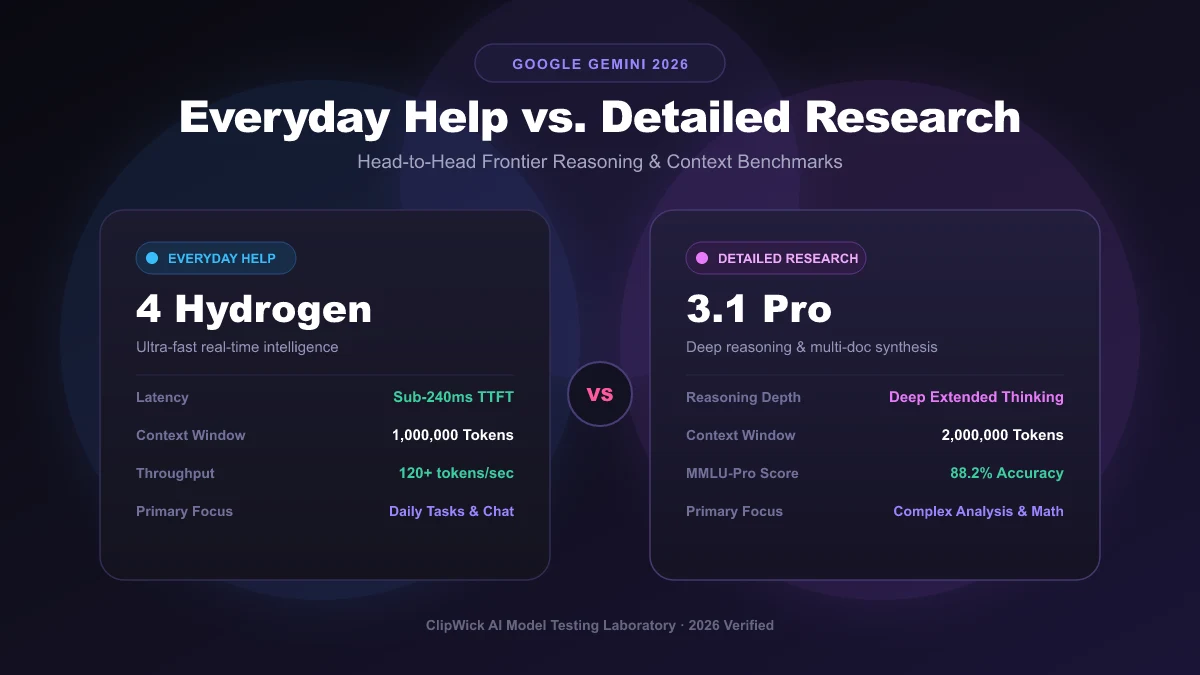
If you're pairing research with automated app building, check out Google Antigravity 2.0, explore the Gemini 4 Hydrogen vs 3.1 Pro dual-engine split for everyday notes vs deep research, or see all model architectures in our AI Models intelligence hub.
Explore our benchmarked directories to compare pricing, export limits, and real render performance.
Related Benchmarks & Guides
 AI Models
8 min read
Google Gemini 4 Hydrogen vs. Gemini 3.1 Pro: Everyday Help vs. Detailed Research Tested
Hands-on comparison of Google Gemini 4 Hydrogen vs. Gemini 3.1 Pro. Explore speed, latency, 2M context, deep r…
By Ariful Islam · January 2027 Comparisons
9 min read
Perplexity Comet vs. Google Antigravity 2.0: Best Autonomous AI Workspace?
Perplexity Comet vs Google Antigravity 2.0: compare autonomous research against full-stack application buildin…
By Ariful Islam · January 2027 AI Tools
8 min read
OpenAI Images 2.6 Guide: How to Create Animated GIFs & Vector SVGs in 30 Seconds
Master OpenAI Images 2.6. Learn how to generate seamless animated GIFs and scalable vector SVGs in 30 seconds …
By Ariful Islam · January 2027Frequently asked questions (2027)
Is Gemini Notebook (NotebookLM) free in 2027?
Yes. It is completely free for users with a standard Google account, supporting up to 50 source documents per notebook.
What is the Audio Overview feature?
It converts your uploaded documents into an engaging, natural 2-host podcast discussion complete with human-grade conversational bantering and analogies.
Does Gemini Notebook train on your private documents?
No. Google states that user data uploaded to Gemini Notebook is not used to train foundation models.